 Your basket is empty.














Categories instructions
instructions
For TQ_V3/V4/V5/V6 NG and MAX Version
TQ V3 Motorised instructions V 1.7.00 "from 23th of march 2023"PDF
last Version: CFY_TQ_Setup_V3_V4_V5_V6_CFY_TQ_Console_V_1.9.3.zip / Requires SimConnect (for PMDG)
last Version: CFY_TQ_Setup_V3_V4_V5_V6_CFY_TQ_Console_V_1.9.3.zip / without SimConnect
Please update FSUIPC4 Current Version 4.975 or FSUIPC5 Current Version 5.157 or FSUIPC6 Curent Version 6.0.10 or XPUIPC Current Version 2.0.5.12
http://www.fsuipc.com or http://www.tosi-online.de/XPUIPC/XPUIPC.html
XPUIPC update "plugin XPUIPC: 2.0.5.25"
Unzip the zip file to X-Plane 11 / Resources / plugins / XPUIPC / 64 /
For iFly: iFlyToFsuipc1.0
2017-08-23
This update solves problem with Speedbrake with ProSim737 // CFY Console V 1.6.40
This version works from ProSim737 version "ProSim737-v1.51b16"
You can find the versions here:
http://download.prosim-ar.com/ProSim737beta/
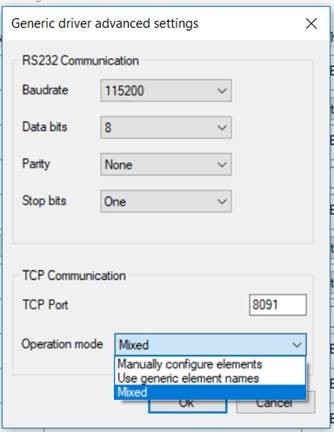
First, you need to enable the mixed mode: